In this article, I want to talk about how to assign the ports of your circuit to the FPGA pins.
This is one of the essential steps you need to take towards the end of the implementation process. I’ll explain this in detail, and by the end, I’ll also provide an example to make the concept clearer for you.
More...
Fundamentals of FPGA Pin Assignment
Let’s start by clarifying exactly what we’re going to discuss.
To do so, I’ll use the diagram show below. In the diagram, you can see a very simple circuit—a PCB (Printed Circuit Board) with an FPGA, an oscillator, and two LEDs.

In this diagram, you can see a PCB with an FPGA, an oscillator, and two LEDs.
Our goal is to design a circuit that turns these LEDs on and off in a specific way.
Since this is a sequential circuit, we’ll need an oscillator, which, as you can see, is located on the board.
Now, suppose that you’ve designed this circuit using a hardware description language like VHDL.
For the Entity of the design, you’ve defined three ports: a clock port and two single-bit ports, LED0 and LED1, which are defined as STD_Logic type.
After synthesizing this code and implementing it on the FPGA, let’s assume that your circuit occupies the blue section of the FPGA show in the above figure.
The ports you’ve defined—clock, LED0, and LED1—are now implemented and exist within this area.
The important point here is that for your circuit to function, these ports must be connected to the appropriate pins on the FPGA.
For example, the clock port in your circuit, which has been implemented in the FPGA, must now be connected to the pin on the FPGA that is connected to the oscillator on the PCB.
This ensures that the clock signal can reach your implemented circuit.
Similarly, the LED0 and LED1 ports must be connected to the FPGA pins that are wired to the LEDs on the board. This way, they can control the LEDs, turning them on and off.
Understanding Constrains and UCF File
In this article, we’re going to talk about how to connect your circuit’s ports in the FPGA to the desired pins.
To do this in the ISE software, you need to use a special feature called constraints. These constraints are written in a specific file known as a UCF file. (UCF is used when working with ISE. If you're usign Vivado, a similar file called XDC is used.)
UCF stands for User Constraints File.
In a UCF file, you can specify various types of constraints and settings for the synthesis, placement, and routing stages.
This is a broad topic, usually related to advanced FPGA implementation.
What I want to discuss in this video, among all these constraints that we can specify in the UCF file, is the constraint related to assigning your circuit's ports to the FPGA's pins.
Interestingly, among all the constraints you can define in a UCF file, the only one that is mandatory for practical implementation is this one.
Without it, the ISE software won’t know which pins on the board you’ve used and cannot automatically connect the circuit’s ports to the pins.
Pin Assignments Using the LOC Constraint
To assign your circuit ports to specific FPGA pins in the UCF file, you need to use a constraint called a location constraint, abbreviated as LOC.
Therefore, each port you’ve defined in the Entity must be connected to a specific FPGA pin using the LOC constraint in the UCF file.
If the ports are single-bit, the process is straightforward: you use the LOC constraint to connect that single bit to the desired pin.
If the ports are vectors or multi-bit, you still need to use the LOC constraint for each bit individually, connecting each one to the appropriate pin on the FPGA.
One thing to keep in mind is that when you’re implementing a design on an FPGA, you’ll usually be working with a pre-designed board.
This means that it’s already clear which FPGA pin is connected to which external component on the board.
So, when preparing the UCF file, you should refer to the board schematic. Use it to identify which pins of the FPGA are connected to each external component, and use this information to complete the UCF file.
FPGA Pin Assignment Example
Now, to make this concept completely clear, let’s go through a simple example together and see how to complete the UCF file.
Imagine you have an FPGA on your board, along with an oscillator, and the FPGA is connected to four LEDs.
We want to control the LEDs and turn them on and off in a specific pattern.
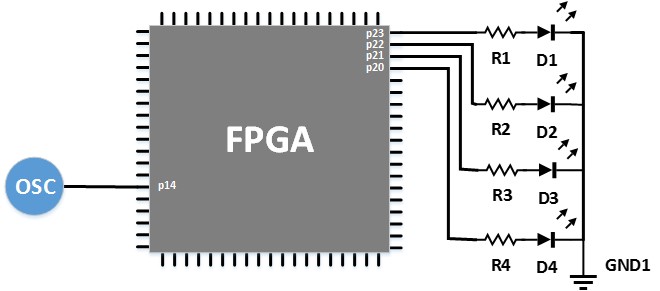
FPGA is connected to four LEDs and an oscillator.
You’d typically write some code for this, and the Entity of that code would look something like this:
entity LED_Counter is
  Port (
    		Clock  :  in   STD_LOGIC;
    		LED    :  out  std_logic_vector (3 downto 0)
			 );
In this Entity, we’ve defined a clock port as an input of type STD_Logic, and an LED port as an output of type STD_Logic_Vector that is four bits wide.
As you can see in the diagram, each bit of this port should be connected to one of the LEDs to control them.
Once you’ve written and synthesized the code, in the placement and routing stages, you’ll need to specify to the ISE software which FPGA pins your ports should be connected to.
In this diagram, for instance, the oscillator is connected to a pin labeled p14.
Similarly, LED1 is connected to a pin labeled p23.
We need to tell the ISE software that when it performs placement and routing, it should connect the circuit ports to the desired pins.
For example, if we want the clock port to be connected to pin number 14, we’ll need to edit the UCF file accordingly.
The UCF file is a simple text file with a .ucf extension. After creating the file, you’d write something like this inside it:
Net "LED[0]" LOC = p23;
Net "LED[1]" LOC = p22;
Net "LED[2]" LOC = p21;
Net "LED[3]" LOC = p20;
For example, to connect the clock port, which you defined in the Entity, to pin number 14 of the FPGA, you’d write a line in the UCF file like this:
Net "Clock" LOC = p14;
This line begins with the keyword NET, followed by the name of the port as defined in the entity. Then, use the LOC constraint, followed by an equals sign, and finally, you specify the desired pin.
Since we want the clock port to be connected to pin 14, we’ve written:
Net clock LOC = p14;
For the LEDs, as shown in the diagram and code, you would do the same thing for each pin.
For example, to connect the bit 0 of the LED port to pin number 23, you’d write:
Net LED[0] LOC = p23;